Why Aren’t My Google Ads Working? (Common Issues We See Across Real Accounts)
Updated: 03/30/2026
Google Ads has changed a lot over the past few years.
What worked in 2020–2021 doesn’t always work now, and a lot of the information out there hasn’t kept up. On top of that, Google keeps pushing automation and “simplified” setups that don’t always perform the way they claim.
This guide breaks down the most common issues we see across accounts we manage and audit, not theory, but actual problems we run into regularly.
Common Reasons Google Ads Aren’t Working
If your campaigns aren’t performing, it usually comes down to one (or more) of these:
Jump To A Topic
1. Keyword Match Types (Broad, Phrase, Exact)
What’s happening
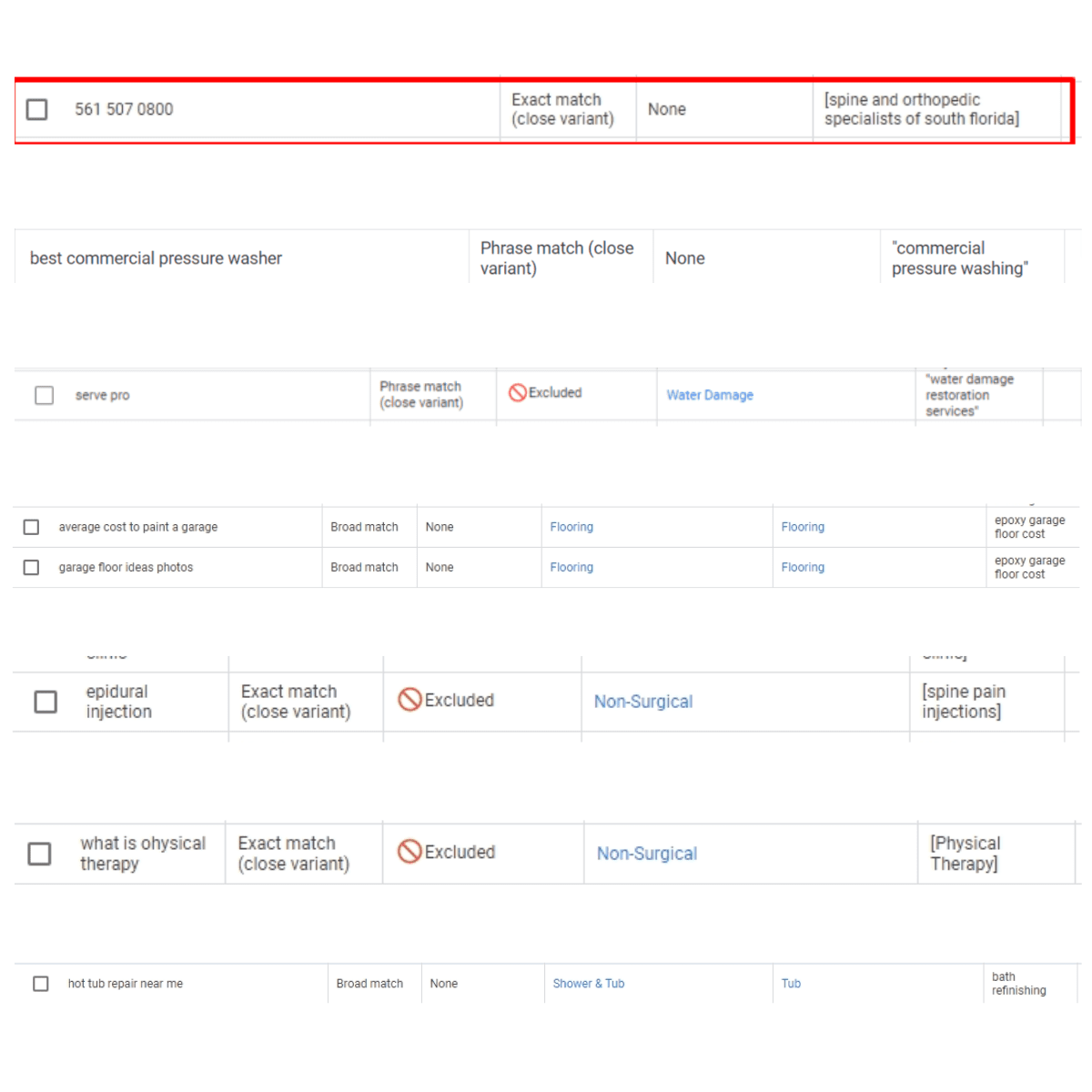
Google pushes broad match heavily now. In theory, it should improve performance using machine learning.
In reality, it often matches to:
loosely related searches
top-of-funnel traffic
completely irrelevant intent
Even phrase and exact match aren’t as strict as they used to be because of “close variants.”
Why this causes problems
You pay for clicks that never convert
Intent is all over the place
Budget gets spread too thin
What we’ve seen
Most accounts we manage:
outperform broad match with tighter control
require constant search term monitoring
still see Google stretch keyword intent
What to do
Use broad match cautiously (test, don’t rely on it)
Monitor search terms regularly
Build strong negative keyword lists
Focus on intent, not just volume
2. Not Using Enough Negative Keywords
What’s happening
A lot of accounts run:
broad match
minimal negatives (sometimes under 100)
That’s not enough anymore.
Why this causes problems
Ads show for DIY searches
Top-of-funnel traffic dominates
Conversions drop or disappear
What we’ve seen
In some cases:
thousands to tens of thousands of negatives are needed
niche industries require extreme filtering
We’ve even had accounts with 25,000+ negatives still pulling irrelevant searches.
10. Google Ads Recommendation Score (What It Actually Means)
What’s happening
Google pushes the recommendation score as a way to “optimize” your account, but in reality, it’s not tied to performance.
You can have:
a high score and poor results
or a low score and strong performance
What we’ve seen
We regularly dismiss a large portion of recommendations, and:
performance does not drop
the score simply redistributes across remaining suggestions
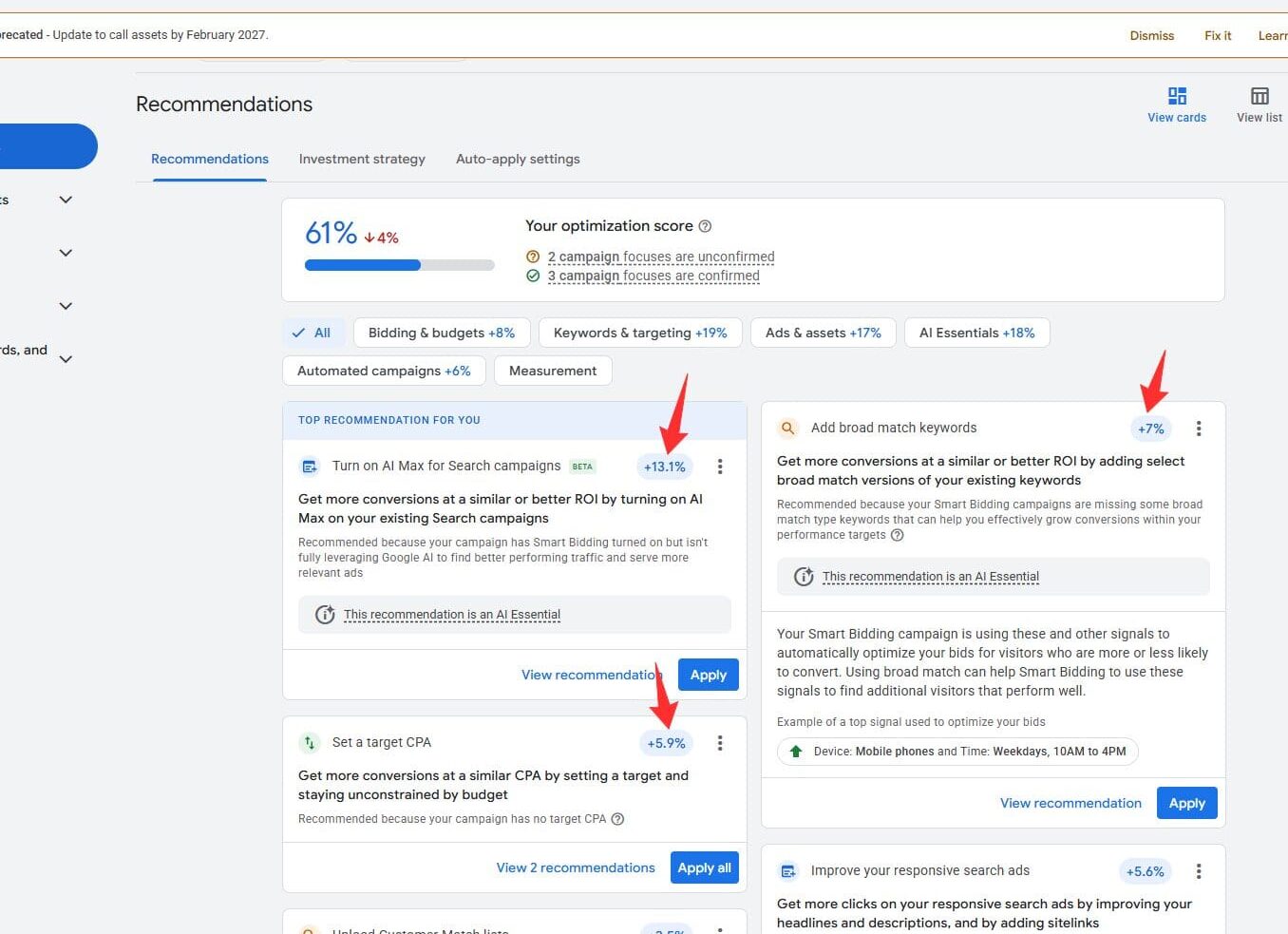
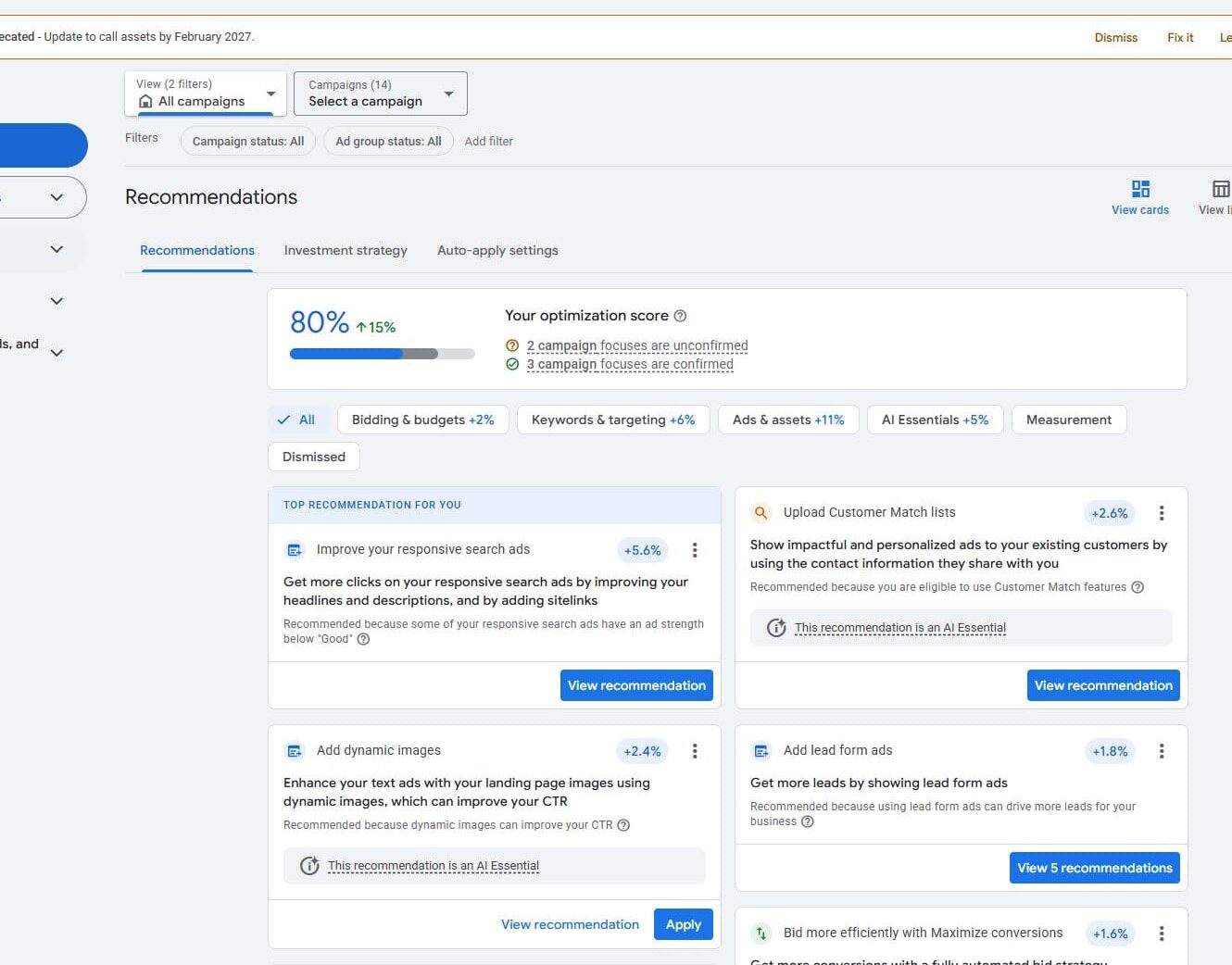
You’ll notice in the image below that once recommendations are dismissed, Google just shifts the percentage to other suggestions instead of reflecting actual performance.
Before dismissing we should see the score increase by +26%
Step 1
Afterwards though we see the score only increased by +19%
Legacy - Step 1
Why this matters
The score is designed to:
push changes
encourage automation
increase spend
Not necessarily improve results.
We’ve even seen recommendations that:
contradict Google’s own ad rules
suggest irrelevant changes
push unnecessary adjustments
Common example
Every account we’ve worked in gets the recommendation to:
Increase budget
Regardless of:
current performance
conversion rate
efficiency
Increasing budget alone does not guarantee better results.
What to do
Don’t optimize for the recommendation score
Review suggestions manually
Apply only what aligns with your strategy
Don’t be afraid to dismiss most of them
11. Dynamic Ad Settings & Automated Assets (Hidden but Impactful)
What’s happening
This is one of the most overlooked settings in Google Ads.
Google automatically enables:
dynamic ad features
automated assets
auto-generated headlines and extensions
Most people don’t even know this is turned on.
What this causes
If enabled, Google can:
replace your headlines with page titles
generate random site links, callouts, and snippets
override your messaging
create ads that don’t match your intent
If your ads look off, inconsistent, or not what you wrote, this is usually why.
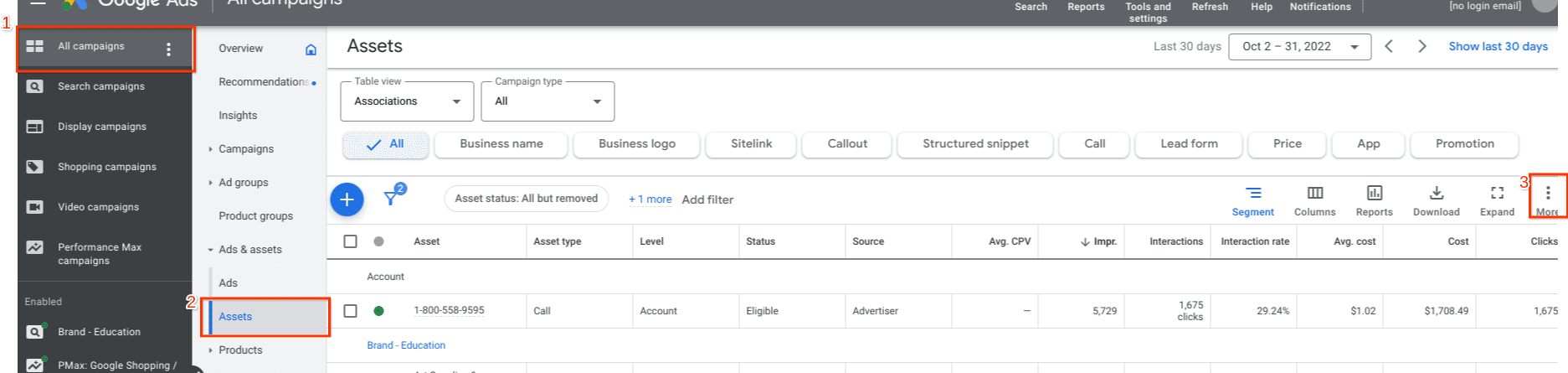
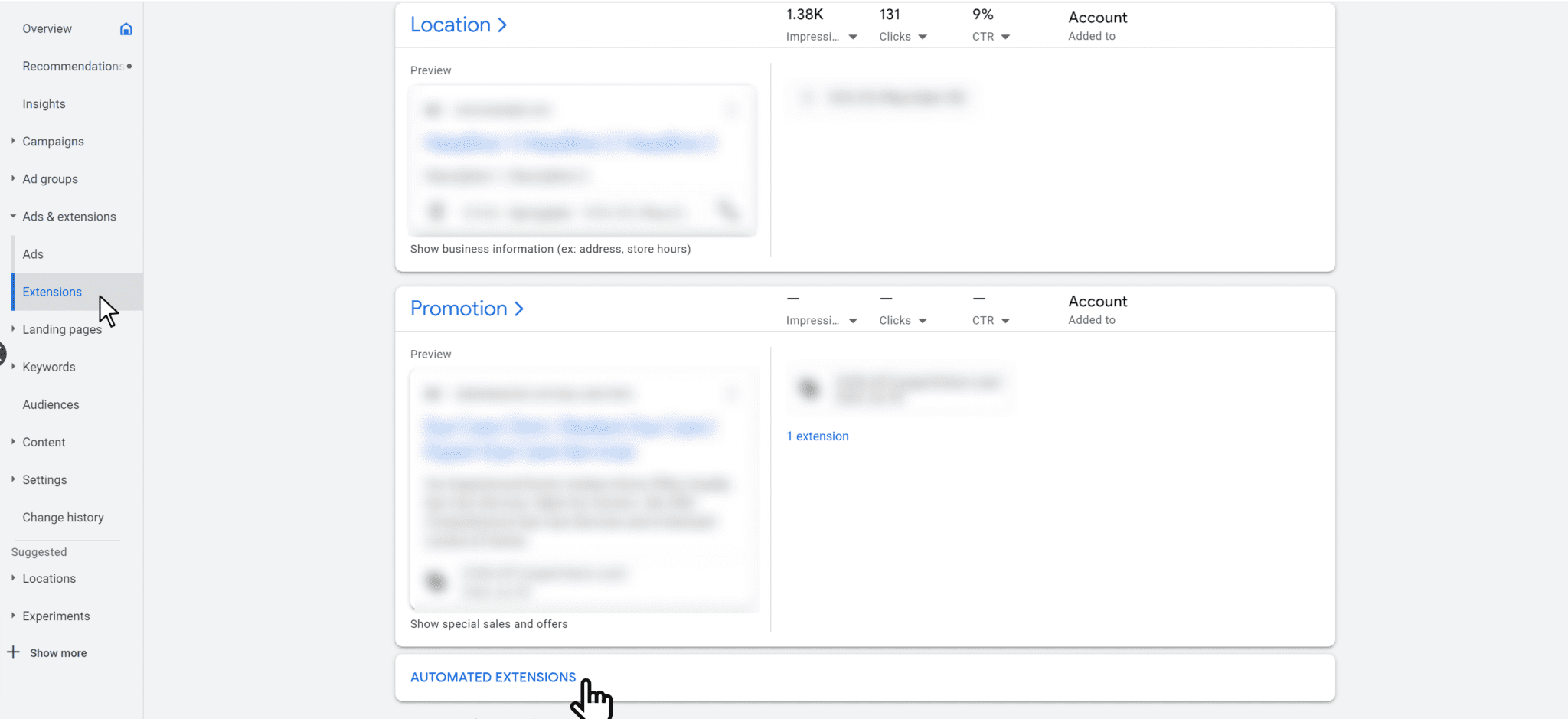
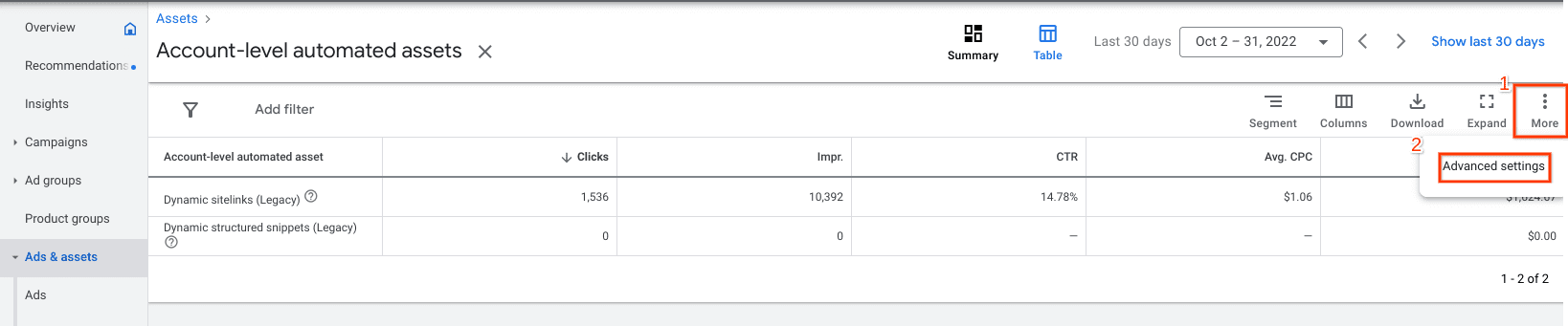
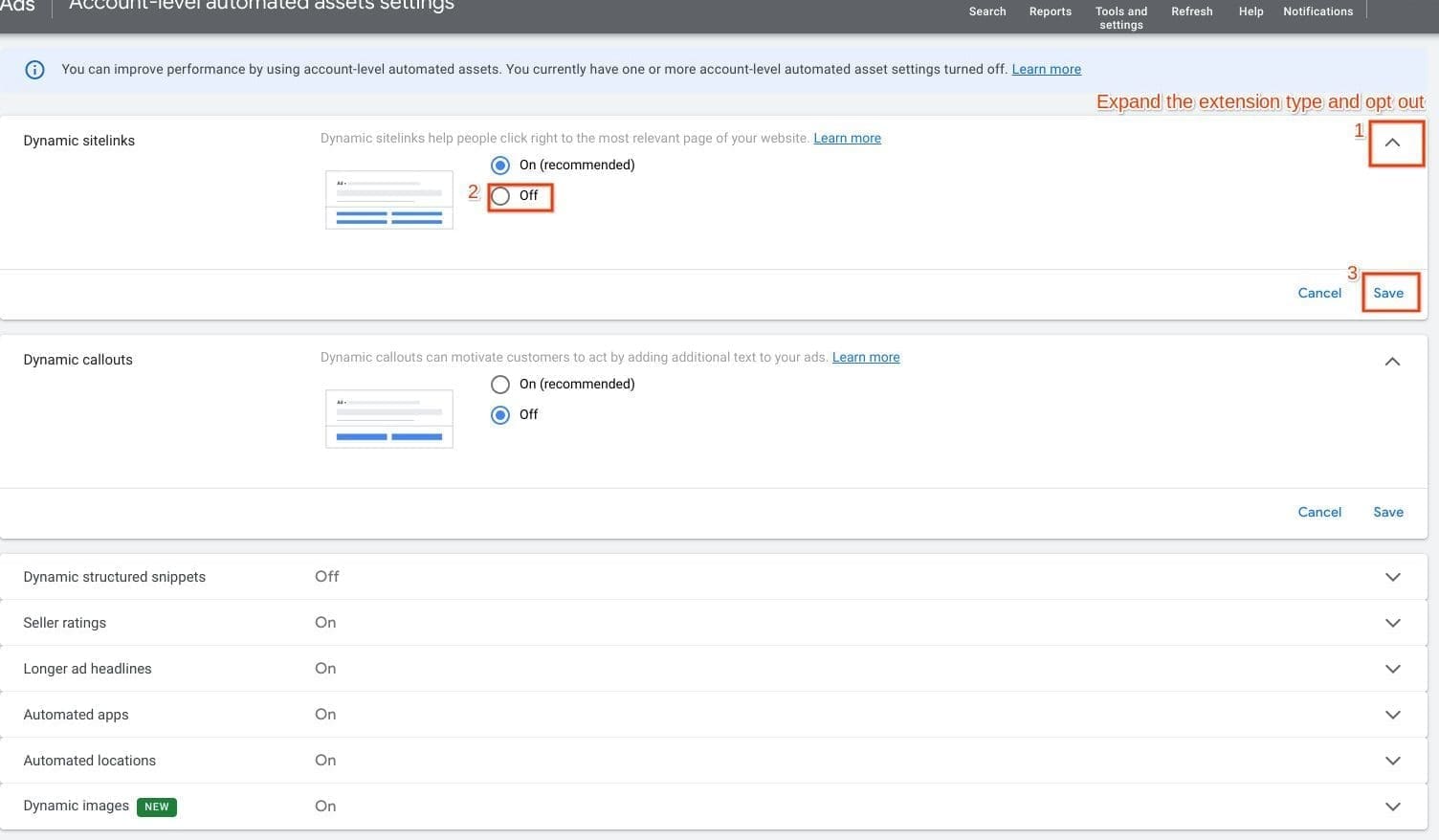
Where to find it
As shown in the image below:
Go to Account-level asset settings
Find the Automated assets section
Review what Google is generating automatically
Step 1
Legacy - Step 1
Step 2
Step 3
What we’ve seen
Across accounts:
messaging gets diluted
branding becomes inconsistent
irrelevant assets get shown
This applies to:
Search campaigns
Performance Max campaigns
What to do
If you want full control over your ads:
disable automated assets
review dynamic settings
manually manage your messaging
Google’s automation can be helpful in some cases, but if you care about:
messaging
consistency
conversion quality
You’ll want to control this yourself.
12. Change History (No Changes vs Too Many Changes)
What’s happening
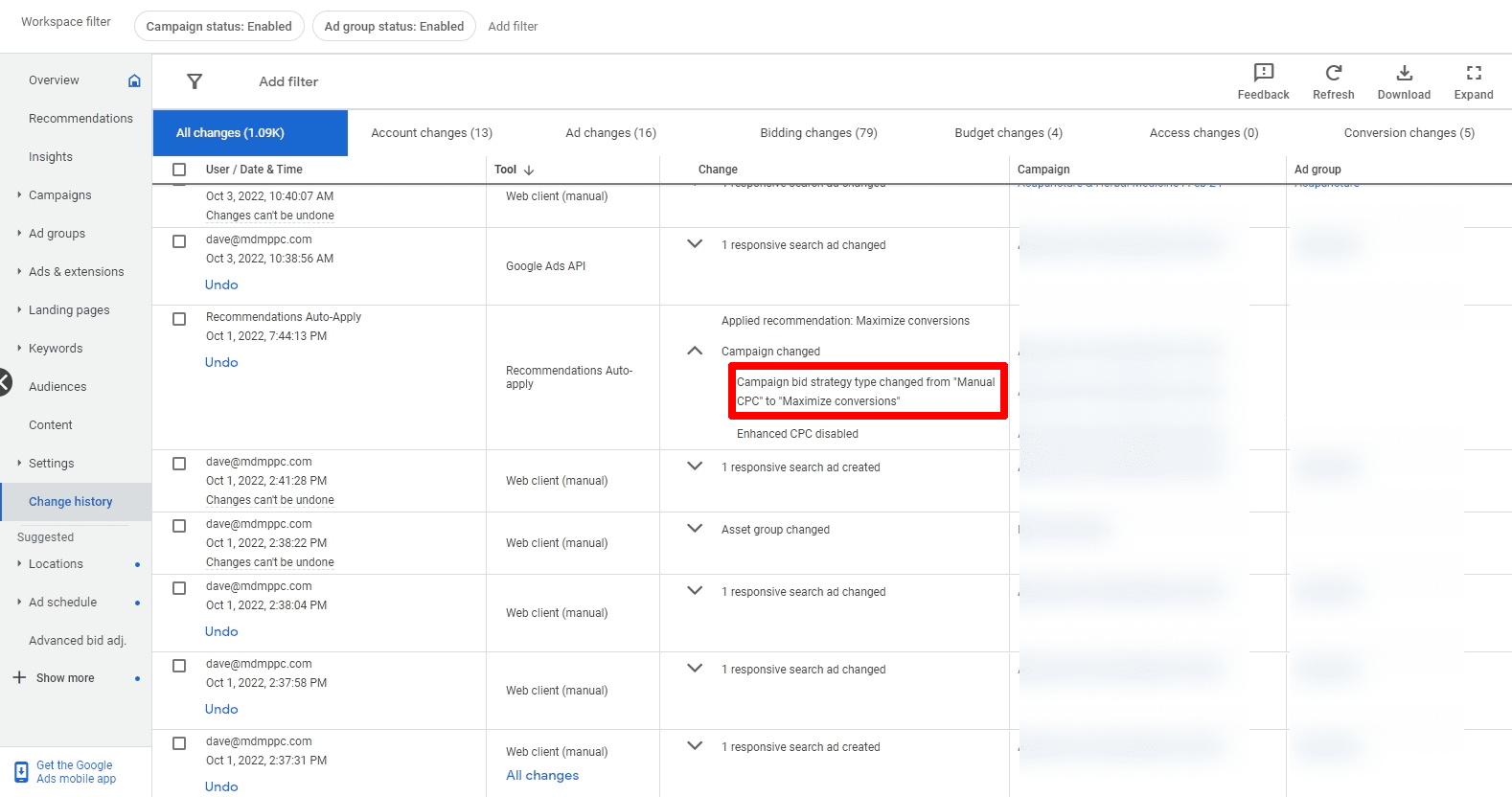
The change history tab is one of the first places we check when performance drops.
It can quickly show:
what changed
when it changed
or if nothing has changed at all
Why this matters
There are two common issues we see:
1. No changes being made at all 2. Too many changes happening too quickly
Both can hurt performance.
Important note
No changes does not automatically mean something is wrong.
There are plenty of situations where:
campaigns are stable
performance is consistent
data is still being reviewed
In those cases, we may:
monitor performance
analyze trends
plan future adjustments
without making immediate changes
Optimization isn’t always about constant edits, sometimes it’s about knowing when not to change things.
When “no changes” is a problem
If performance is:
declining
inconsistent
or stagnant over time
and there are:
no adjustments
no testing
no direction
then it’s likely an issue
On the other side: too many changes
We also see accounts where:
changes are made daily
strategies are constantly shifted
data never has time to settle
This creates:
unstable performance
misleading data
poor decision-making
What we’ve found works best
New campaigns → more frequent adjustments
Stable campaigns → weekly or monthly reviews
Larger accounts → focused changes across specific campaigns
Even when no changes are made:
we’re still reviewing:
search terms
conversion data
spend trends
performance by segment
What to do
Review change history regularly
Avoid making constant reactive changes
Don’t assume inactivity means neglect
Focus on data-driven timing, not forced updates
13. Blindly Following Google Support Recommendations